

JILIEVO Deposit Philippines
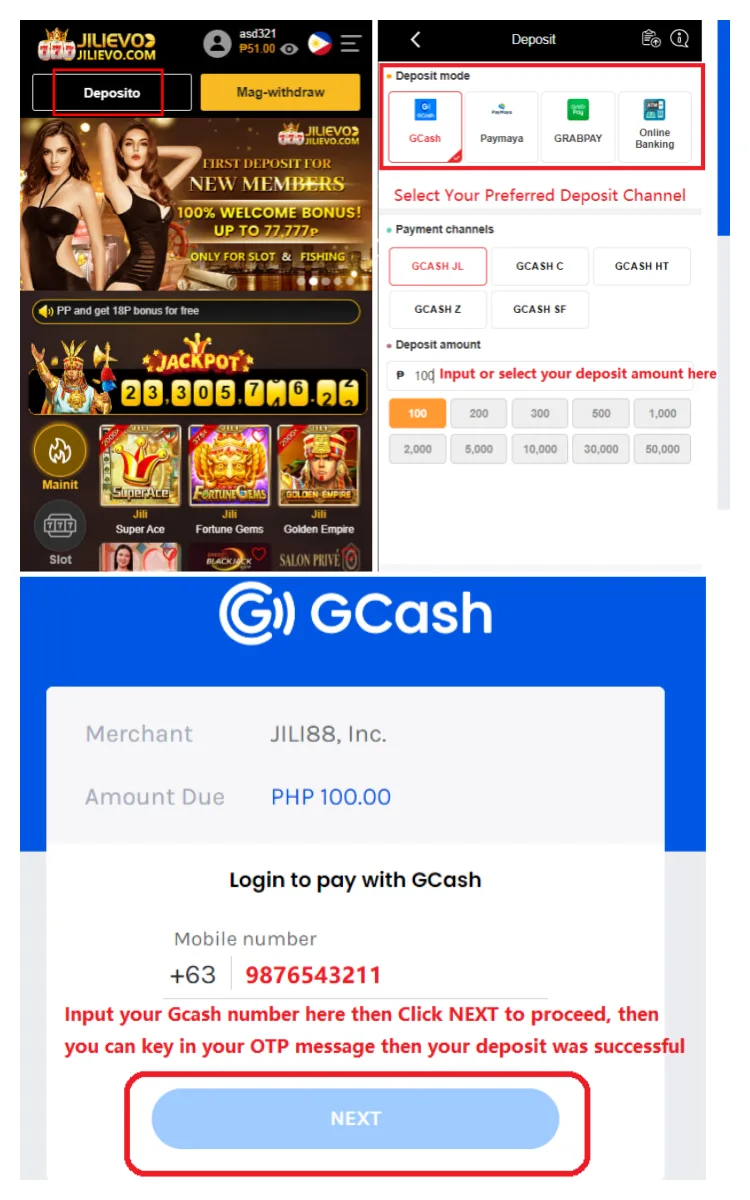
Fund your JILIEVO balance in Philippine pesos through GCash, bank transfer or another payment channel currently shown in the Member Center. Deposits are available 24 hours a day and usually reflect within five minutes, although bank checks, maintenance and payment-network traffic can take longer.
Check the cashier before sending money because the available channel, receiving account and limits can change. Never reuse an old bank or e-wallet destination from a previous transaction unless JILIEVO displays it again for the new deposit.
Current JILIEVO Deposit Limits
- Bank transfer: published minimum ₱2,000 and maximum ₱200,000 per transaction.
- GCash and other listed channels: published minimum ₱100 and maximum ₱50,000 per transaction.
- Availability: deposit requests can be made 24/7.
- Typical credit time: most successful payments appear within five minutes.
These are the limits currently stated by JILIEVO. The amount displayed beside your selected payment method in the Member Center controls the transaction, especially when a channel is under maintenance or has a temporary daily cap.
How to Deposit with GCash
- Log in to JILIEVO and enter the Deposit area in the Member Center.
- Select GCash if it is available, then enter an amount within the displayed limit.
- Copy the current recipient details or follow the generated payment instructions exactly.
- Complete the transfer in GCash and keep the reference number or receipt.
- Return to JILIEVO and submit any requested transaction details, then check your balance.
Send the exact amount attached to the request. A different amount, expired payment instruction or incorrect reference can prevent automatic matching and delay the credit.
How to Deposit by Bank Transfer
- Select Bank Transfer and confirm that your deposit meets the current ₱2,000 minimum.
- Use only the bank account generated for that request.
- Enter the correct amount and payment reference in your banking app.
- Save the successful transfer receipt until the funds appear in JILIEVO.
The published maximum for bank transfer is ₱200,000. If you plan to deposit a larger amount, do not split it into repeated transfers without checking the cashier limits and support instructions first.
Claim a Promotion Before You Bet
Check the current JILIEVO promotions before confirming a deposit. Some offers must be selected during the deposit process and may apply only to named providers or game categories. For example, the published 120% welcome package covers the first three qualifying deposits but is restricted to eligible JILI, PG and FC slot bets.
Read the minimum deposit, bonus cap and turnover requirement before opting in. A bonus adds wagering conditions to the balance, so choose it only when you intend to play the eligible games and complete the required valid bets.
Deposit Missing After 20 Minutes?
First check that GCash or your bank shows a successful transfer rather than pending, reversed or failed. Compare the amount, recipient and reference with the JILIEVO request, then refresh your balance once.
If the funds still have not appeared after 20 minutes, contact JILIEVO support and provide your username, deposit amount, payment time and transaction reference. Share a receipt that shows the transfer details, but never disclose your password, fund password, one-time PIN or full account credentials.
Deposit Safely
- Start every payment from your logged-in JILIEVO Member Center.
- Confirm the recipient before sending pesos.
- Keep one receipt for every transaction until it is credited.
- Do not send another payment to fix a delayed deposit unless support gives new instructions.
Once your balance is credited, play only with a fixed session amount. Review JILIEVO’s responsible gambling information before raising a deposit limit or chasing previous losses.
Fund Your JILIEVO Account
Choose the live GCash or bank option, confirm its current limit and complete the payment using the details generated for your request.